
Comparing and converting schemas#
A schema is rarely the last word. It gets rewritten as the model changes, and it gets
reused. rudof has one operation for each of those jobs:
compare_schemas says how two schemas differ, and convert_schemas turns one into
something else.
Preliminaries#
%pip install -q "pyrudof>=0.3.22"
Note: you may need to restart the kernel to use updated packages.
from pyrudof import ReaderMode, Rudof

rudof = Rudof()
Comparing#
Schemas change. A property is renamed, a datatype is tightened, a constraint is added… and the interesting question for everyone downstream is what exactly changed. Diffing the schema files as text answers that badly: reordering, reformatting and prefix changes all show up as differences, while a genuine change hidden behind a renamed prefix does not.
rudof compares two schemas structurally, at the level of shapes and properties, which ignores everything that is only notation.
Two versions of a model#
Here are two takes on the same :Person shape. Version 1 records an age and a weight;
version 2 has dropped both, added a birth date, and uses the prefix ex: where version 1 used the default prefix :. Both prefixes expand to http://example.org/, so the two schemas share far more than a textual diff would suggest.
schema1 = """
PREFIX :    <http://example.org/>
PREFIX xsd: <http://www.w3.org/2001/XMLSchema#>

:Person {
   :name     xsd:string  ;
   :age      xsd:integer ;
   :weight   xsd:float   ;
   :worksFor .
}
"""
schema2 = """
PREFIX ex:  <http://example.org/>
PREFIX xsd: <http://www.w3.org/2001/XMLSchema#>

ex:Person {
   ex:name      xsd:string ;
   ex:birthDate xsd:date   ;
   ex:worksFor  .
}
"""
Running the comparison#
compare_schemas takes the two schemas and, for each one, how to read it. The positional
arguments come in pairs, one per schema:
Arguments |
Meaning |
|---|---|
|
the schemas themselves, as content or as paths |
|
the schema language: |
|
the concrete syntax: |
|
base IRI for resolving relative IRIs, or |
|
which shape to compare, as a full IRI |
|
|
The labels are not optional in practice: a schema usually declares several shapes, and the comparison is between one shape and one shape. Note that they are given as full IRIs, not as the qualified names used in the schema text.
result = rudof.compare_schemas(
    schema1, schema2,
    "shex", "shex",
    "shexc", "shexc",
    None, None,
    "http://example.org/Person", "http://example.org/Person",
    ReaderMode.Lax,
)

print(result)
Shapes Comparison:
 Equal properties:
  - http://example.org/name:
  - descr1:   - value: http://example.org/name
  - datatype: http://www.w3.org/2001/XMLSchema#string

  - descr2:   - value: http://example.org/name
  - datatype: http://www.w3.org/2001/XMLSchema#string


  - http://example.org/worksFor:
  - descr1:   - value: http://example.org/worksFor
  - datatype: _

  - descr2:   - value: http://example.org/worksFor
  - datatype: _


 Properties in shape 1 that are not in shape 2:
  - http://example.org/weight:
  - descr:   - value: http://example.org/weight
  - datatype: http://www.w3.org/2001/XMLSchema#float


  - http://example.org/age:
  - descr:   - value: http://example.org/age
  - datatype: http://www.w3.org/2001/XMLSchema#integer


 Properties in shape 2 that are not in shape 1:
  - http://example.org/birthDate:
  - descr:   - value: http://example.org/birthDate
  - datatype: http://www.w3.org/2001/XMLSchema#date
The report is in three parts, and each answers a different question:
Equal properties: what a consumer of version 1 can keep relying on.
:nameand:worksForsurvived the rename unchanged, because the comparison works on expanded IRIs.Properties in shape 1 that are not in shape 2: what will disappear:
:ageand:weight. Code that reads them needs to change.Properties in shape 2 that are not in shape 1: what is new:
:birthDate. Producers need to start emitting it.
A property that exists in both but with a different datatype shows up in both of the last two sections, with its datatype spelled out in each, so a tightened constraint is visible rather than silently “equal”.
Comparing a schema with itself#
The degenerate case is worth seeing, because it is what a passing check looks like in CI: every property lands in Equal properties and the other two sections are empty.
result = rudof.compare_schemas(
    schema1, schema1,
    "shex", "shex",
    "shexc", "shexc",
    None, None,
    "http://example.org/Person", "http://example.org/Person",
    ReaderMode.Lax,
)

print(result)
Shapes Comparison:
 Equal properties:
  - http://example.org/worksFor:
  - descr1:   - value: http://example.org/worksFor
  - datatype: _

  - descr2:   - value: http://example.org/worksFor
  - datatype: _


  - http://example.org/name:
  - descr1:   - value: http://example.org/name
  - datatype: http://www.w3.org/2001/XMLSchema#string

  - descr2:   - value: http://example.org/name
  - datatype: http://www.w3.org/2001/XMLSchema#string


  - http://example.org/age:
  - descr1:   - value: http://example.org/age
  - datatype: http://www.w3.org/2001/XMLSchema#integer

  - descr2:   - value: http://example.org/age
  - datatype: http://www.w3.org/2001/XMLSchema#integer


  - http://example.org/weight:
  - descr1:   - value: http://example.org/weight
  - datatype: http://www.w3.org/2001/XMLSchema#float

  - descr2:   - value: http://example.org/weight
  - datatype: http://www.w3.org/2001/XMLSchema#float
What can go wrong#
The most common error is forgetting the shape labels. Without them rudof has no way to know which shape you meant, and says so:
from pyrudof import ComparisonError

try:
    rudof.compare_schemas(schema1, schema2, "shex", "shex", "shexc", "shexc")
except ComparisonError as e:
    print(f"{type(e).__name__}: {e}")
ComparisonError: Schema comparison error: Error converting ShEx to CoShaMo for source 'string': No shape label provided (check option to add shape label)
Converting#
convert_schemas is rudof’s general schema converter. Every call names four things: what
language is coming in, what language should come out, and the concrete syntax of each.
The two Mode enums list the languages and the two Format enums the syntaxes:
from pyrudof import (
    ConversionFormat,
    ConversionMode,
    ResultConversionFormat,
    ResultConversionMode,
)

print("input modes:   ", [str(m) for m in ConversionMode.all()])
print("output modes:  ", [str(m) for m in ResultConversionMode.all()])
print("input formats: ", [str(f) for f in ConversionFormat.all()])
print("output formats:", [str(f) for f in ResultConversionFormat.all()])
input modes:    ['Shacl', 'ShEx', 'Dctap']
output modes:   ['Sparql', 'ShEx', 'Uml', 'Html', 'Shacl']
input formats:  ['Csv', 'ShExC', 'ShExJ', 'Turtle', 'Xlsx']
output formats: ['Default', 'Internal', 'Json', 'ShExC', 'ShExJ', 'Turtle', 'PlantUML', 'Html', 'Svg', 'Png']
Not every pair of modes is implemented. What the enums list is the ambition; what works
today in the published pyrudof is this:
From ↓ To → |
ShEx |
SHACL |
UML |
SPARQL |
|---|---|---|---|---|
ShEx |
✓ |
— |
✓ |
✓ |
SHACL |
partial |
✓ |
— |
— |
DCTAP |
✓ |
— |
✓ |
— |
A cell marked — raises ConversionError, which is easy to handle. SHACL as an input is
the one to be careful with: it converts only the simplest shapes, and on anything with a
cardinality or a node reference the published version aborts the process rather than
raising. The examples below stay on the paths that work.
DCTAP to ShEx#
This is the conversion that makes DCTAP worth using: a table that domain experts maintain in a spreadsheet becomes a schema that machines validate against.
It needs one thing the table does not say: which IRIs the bare names in it stand for.
Person in a shapeId column has to become an IRI, and name in a propertyId column
likewise. That is what the [tap2shex] section of a rudof configuration file is for. Without it, rudof falls back to a http://default/ namespace, and the generated schema is technically correct but useless in practice.
from pathlib import Path
from tempfile import TemporaryDirectory

from pyrudof import RudofConfig

CONFIG_TOML = """
[tap2shex]
base_iri = "http://example.org/"

[tap2shex.prefixmap]
"" = "http://example.org/"
xsd = "http://www.w3.org/2001/XMLSchema#"
rdfs = "http://www.w3.org/2000/01/rdf-schema#"
"""

tmpdir = TemporaryDirectory()
config_path = Path(tmpdir.name) / "config.toml"
config_path.write_text(CONFIG_TOML)

tap = Rudof(RudofConfig.from_path(config_path))
The profile is the one from the DCTAP chapter:
dctap_str = """shapeId,propertyId,mandatory,repeatable,valueDatatype,valueShape
Person,name,true,false,xsd:string,
,birthdate,false,false,xsd:date,
,worksFor,false,true,,Company
Company,name,true,false,xsd:string,
,employee,false,true,,Person
"""

shex_schema = tap.convert_schemas(
    dctap_str,
    input_mode=ConversionMode.Dctap,
    output_mode=ResultConversionMode.ShEx,
    input_format=ConversionFormat.Csv,
    output_format=ResultConversionFormat.ShExC,
)

print(shex_schema)
prefix : <http://example.org/>
prefix rdfs: <http://www.w3.org/2000/01/rdf-schema#>
prefix xsd: <http://www.w3.org/2001/XMLSchema#>
:Person { :name xsd:string; :birthdate xsd:date ?; :worksFor @:Company * }
:Company { :name xsd:string; :employee @:Person * }
Using the result#
The round trip is the point, so it is worth closing: load the generated schema and validate real data against it.
tap.read_shex(shex_schema)

tap.read_data("""
prefix :    <http://example.org/>
prefix xsd: <http://www.w3.org/2001/XMLSchema#>

:alice :name      "Alice"                ;
       :birthdate "1970-01-01"^^xsd:date ;
       :worksFor  :acme                  .
:acme  :name      "ACME INC."            .

:bob   :name      23                     .
""")

tap.read_shapemap(":alice@:Person, :acme@:Company, :bob@:Person")
report = tap.validate_shex()

print("conforms:", report.conforms)
conforms: False
:alice and :acme are fine. :bob has a :name that is an integer where the profile
said xsd:string, so it fails (against a constraint that was written in a spreadsheet
cell).
for entry in report.violations:
    print(f"{entry.node} failed {entry.shape}:")
    print(entry.details)
http://example.org/bob failed http://example.org/Person:
Datatype error on node :bob for property :name: found xsd:integer, expected xsd:string, lexical form "23"^^xsd:integer
Between syntaxes of one language#
input_mode and output_mode do not have to differ. Keeping both on ShEx and changing
only the formats re-serializes a schema: here from the compact syntax people write to the
JSON one tools consume.
shex_source = """
PREFIX :    <http://example.org/>
PREFIX xsd: <http://www.w3.org/2001/XMLSchema#>

:Person {
  :name      xsd:string  ;
  :birthDate xsd:date ?  ;
  :worksFor  @:Company * ;
}

:Company {
  :name xsd:string ;
}
"""

shexj = rudof.convert_schemas(
    shex_source,
    input_mode=ConversionMode.ShEx,
    output_mode=ResultConversionMode.ShEx,
    input_format=ConversionFormat.ShExC,
    output_format=ResultConversionFormat.ShExJ,
)

print(shexj[:420], "...")
{
  "@context": "http://www.w3.org/ns/shex.jsonld",
  "type": "Schema",
  "shapes": [
    {
      "type": "ShapeDecl",
      "id": "http://example.org/Person",
      "abstract": false,
      "shapeExpr": {
        "type": "Shape",
        "expression": {
          "type": "EachOf",
          "expressions": [
            {
              "type": "TripleConstraint",
              "predicate": "http://example.org/name",
 ...
ShEx to a diagram#
ResultConversionMode.Uml draws the schema. Asking for PlantUML gives the diagram
source, but Svg and Png make rudof render it too, so a notebook can display the picture
without any diagram tooling installed.
from IPython.display import SVG

svg = rudof.convert_schemas(
    shex_source,
    input_mode=ConversionMode.ShEx,
    output_mode=ResultConversionMode.Uml,
    input_format=ConversionFormat.ShExC,
    output_format=ResultConversionFormat.Svg,
)

SVG(svg)
---------------------------------------------------------------------------
ConversionError                           Traceback (most recent call last)
Cell In[14], line 3
      1 from IPython.display import SVG
      2
----> 3 svg = rudof.convert_schemas(
      4     shex_source,
      5     input_mode=ConversionMode.ShEx,
      6     output_mode=ResultConversionMode.Uml,

ConversionError: Conversion error: Conversion error from 'shex' to 'uml' with input format 'shexc' and output format 'svg': Required external resource not found at plantuml.jar
Error: file does not exist
Hint: set the PLANTUML environment variable
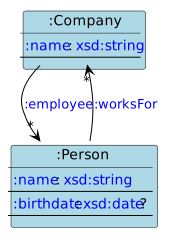
Each shape is a class, each datatype constraint a field with its cardinality, and each
shape reference an arrow (:worksFor points from :Person to :Company with
multiplicity *).
The same works from DCTAP, which is the quickest way to review a profile with whoever wrote the spreadsheet:
SVG(tap.convert_schemas(
    dctap_str,
    input_mode=ConversionMode.Dctap,
    output_mode=ResultConversionMode.Uml,
    input_format=ConversionFormat.Csv,
    output_format=ResultConversionFormat.Svg,
))
ResultConversionMode.Html produces browsable HTML documentation from the same input. It writes
several files rather than returning a string, so it needs an output_folder and a
templates_folder.
ShEx to SPARQL#
The last output mode is the surprising one: a shape is a description of a neighbourhood, so
it can be turned into a SPARQL query that retrieves exactly that
neighbourhood. shape picks which one, as a prefixed name.
sparql = rudof.convert_schemas(
    shex_source,
    input_mode=ConversionMode.ShEx,
    output_mode=ResultConversionMode.Sparql,
    input_format=ConversionFormat.ShExC,
    output_format=ResultConversionFormat.Default,
    base="http://example.org/",
    shape=":Person",
)

print(sparql)
http://example.org/
prefix : <http://example.org/>
prefix xsd: <http://www.w3.org/2001/XMLSchema#>

SELECT * WHERE {
 ?this :name ?name .
 ?this :birthDate ?birthDate .
 ?this :worksFor ?worksFor .
}
That is a ready-made query for every :Person in a dataset, generated from the shape
rather than written by hand.
Two rough edges to know about. The first line of the output is the base IRI, echoed by the
converter and not part of the query, so strip it before running the text. And shape must
be a prefixed name: passing the full IRI http://example.org/Person fails looking up
http as a prefix.
tmpdir.cleanup()
References#
rudof documentation - the
compareandconvertsubcommands of the command line tool, which expose the same functionality.