

ShEx#
This chapter is a short introduction to ShEx using rudof.
Preliminaries: install and configure rudof#
%pip install -q "pyrudof>=0.3.22"
%pip install -q plantuml
Note: you may need to restart the kernel to use updated packages.
Note: you may need to restart the kernel to use updated packages.
from pyrudof import Rudof

rudof = Rudof()
Describing data with ShEx#
ShEx (Shape Expressions) is a concise, human-readable language for describing and validating RDF. A schema is a set of shape declarations; each shape names a set of constraints on the neighbourhood of a node: which properties it may or must have, how many times, and what their values must look like.
Schemas can be written in three interchangeable formats: the compact syntax ShExC (what we use below), a JSON-LD syntax ShExJ, and an RDF vocabulary ShExR. rudof reads and writes all three.
Here is a small schema describing users and companies:
rudof.read_shex("""
prefix :     <http://example.org/>
prefix xsd:  <http://www.w3.org/2001/XMLSchema#>

:User {
 :name      xsd:string   ;
 :birthDate xsd:date     ;
 :knows     @:User     * ;
 :worksFor  @:Company  *
}

:Company {
  :name     xsd:string    ;
  :code     xsd:integer   ;
  :employee @:User      *
}
""")
Reading that shape by shape:
:name xsd:string: exactly one:name, whose value is a string. A triple constraint with no cardinality means exactly one.:knows @:User *: zero or more:knows, and each value must itself conform to:User. The@marks a shape reference, which is what lets shapes describe a graph rather than isolated nodes.The cardinality suffixes are the familiar ones:
?for optional,*for zero or more,+for one or more, and{m,n}for an explicit range.
And some data to check against it:
rudof.read_data("""
prefix : <http://example.org/>
prefix xsd: <http://www.w3.org/2001/XMLSchema#>

:alice a :Person ;
 :name      "Alice"                ;
 :birthDate "2005-03-01"^^xsd:date ;
 :worksFor  :acme                  ;
 :knows     :bob                   .
:bob a :Person   ;
 :name      "Robert Smith"         ;
 :birthDate "2003-01-02"^^xsd:date ;
 :worksFor  :acme                  ;
 :knows     :alice                 .
:acme  a :Company  ;
 :name      "Acme Inc." ;
 :code      23          .
""")
Shape maps#
A ShEx schema by itself does not say which nodes to check. The missing half is a shape map: a list of pairs associating a node selector with a shape.
The simplest shape map is a single pair, node@shape. rudof keeps the current shape map in
the session, so it can be reused across validations:
rudof.read_shapemap(":alice@:User")
With a schema, data and a shape map all loaded, validate_shex() runs the validation:
report = rudof.validate_shex()

print("conforms:", report.conforms)
conforms: True
validate_shex returns a
ShExValidationReport.
conforms is the one-line answer; iterating the report yields one entry per node/shape pair
that was checked, and violations narrows that to the failures.
for entry in report:
    print(f"{entry.node}  @  {entry.shape}  ->  {entry.status}")
http://example.org/alice @ http://example.org/User -> conformant
Let’s look at a pair that fails. :acme is a company, so checking it against :User
should not conform:
rudof.read_shapemap(":acme@:User")
report = rudof.validate_shex()

print("conforms:", report.conforms)
for entry in report.violations:
    print(f"\n{entry.node} failed {entry.shape}:")
    print(entry.details)
conforms: False

http://example.org/acme failed http://example.org/User:
Shape :User failed for node :acme: no candidates matched the expression
└── Candidate [:name "Acme Inc."] rejected: predicate :birthDate required cardinality {1, 1} but got 0
A shape map can hold several pairs, separated by commas, so one call validates them all:
rudof.read_shapemap(":alice@:User, :bob@:User, :acme@:Company")
report = rudof.validate_shex()

print("conforms:", report.conforms)
print(f"{len(report)} pairs checked, {len(report.violations)} violations")
conforms: True
3 pairs checked, 0 violations
Rendering the report#
Alongside the report object, serialize_shex_validation_results renders the results for
a human. ResultShexValidationFormat chooses the rendering and ShexValidationSortMode
the ordering:
from pyrudof import ResultShexValidationFormat, ShexValidationSortMode

print([str(f) for f in ResultShexValidationFormat.all()])
print([str(m) for m in ShexValidationSortMode.all()])
['Details', 'Turtle', 'NTriples', 'RdfXml', 'TriG', 'N3', 'NQuads', 'Compact', 'Json', 'Csv']
['Node', 'Shape', 'Status', 'Details']
print(rudof.serialize_shex_validation_results(
    ResultShexValidationFormat.Compact,
    ShexValidationSortMode.Node,
))
╭────────┬──────────┬────────╮
│ Node   │ Shape    │ Status │
├────────┼──────────┼────────┤
│ :acme  │ :Company │ OK     │
├────────┼──────────┼────────┤
│ :alice │ :User    │ OK     │
├────────┼──────────┼────────┤
│ :bob   │ :User    │ OK     │
╰────────┴──────────┴────────╯
Details adds the explanation of each outcome, which is what you want when a validation
fails and you need to know why:
rudof.read_shapemap(":acme@:User")
rudof.validate_shex()

print(rudof.serialize_shex_validation_results(ResultShexValidationFormat.Details))
╭───────┬───────┬────────┬──────────────────────────────────────────────────────────────────────────────────╮
│ Node  │ Shape │ Status │ Details                                                                          │
├───────┼───────┼────────┼──────────────────────────────────────────────────────────────────────────────────┤
│ :acme │ :User │ FAIL   │ Shape :User failed for node :acme: no candidates matched the expression          │
│       │       │        │ └── Candidate [:name "Acme Inc."] rejected: predicate :birthDate required cardin │
│       │       │        │ ality {1, 1} but got 0                                                           │
╰───────┴───────┴────────┴──────────────────────────────────────────────────────────────────────────────────╯
The shape map itself can be serialized too:
from pyrudof import ShapeMapFormat

rudof.read_shapemap(":alice@:User, :bob@:User")
print(rudof.serialize_shapemap(ShapeMapFormat.Compact))
:alice@:User
:bob@:User
Checking a schema before using it#
A schema can be syntactically valid and still be unusable. The classic case is a negative
cycle: two shapes that depend on each other through a negation, so that no assignment of
conformance to nodes is consistent. check_shex compiles a schema and reports whether it is
well formed, without loading it into the session.
with Rudof() as session:
    ok, message = session.check_shex("""
    prefix : <http://example.org/>
    :Person { :name . }
    """)
    print(ok, "|", message)
True | Schema is valid: well-formed and contains no negative cycles.
with Rudof() as session:
    ok, message = session.check_shex("""
    prefix : <http://example.org/>
    :A { :p @:B }
    :B { :q NOT @:A }
    """)
    print(ok)
    print(message)
False
Schema contains negative cycles in its dependency graph:

Negative cycle #1:
  Shapes involved:
    - :A
    - :B

  Negative cycle path:
    :A <--[NOT]-- :B <-- :A
Converting and inspecting a loaded schema#
serialize_current_shex writes the schema currently in the session. Since rudof reads and
writes ShExC, ShExJ and ShExR, this doubles as a format converter:
from pyrudof import ShExFormat

with Rudof() as session:
    session.read_shex("""
    prefix :    <http://example.org/>
    prefix xsd: <http://www.w3.org/2001/XMLSchema#>

    :User { :name xsd:string ; :worksFor @:Company * }
    :Company { :name xsd:string }
    """, base="http://example.org/")

    print(session.serialize_current_shex(format=ShExFormat.ShExJ)[:600], "...")
{
  "@context": "http://www.w3.org/ns/shex.jsonld",
  "type": "Schema",
  "shapes": [
    {
      "type": "ShapeDecl",
      "id": "http://example.org/User",
      "abstract": false,
      "shapeExpr": {
        "type": "Shape",
        "expression": {
          "type": "EachOf",
          "expressions": [
            {
              "type": "TripleConstraint",
              "predicate": "http://example.org/name",
              "valueExpr": {
                "type": "NodeConstraint",
                "datatype": "http://www.w3.org/2001/XMLSchema#string"
              }
            },
           ...
It also knows how to report about the schema rather than just re-emit it. show_statistics
counts the shapes, and show_dependencies prints the dependency graph between them.
with Rudof() as session:
    session.read_shex("""
    prefix : <http://example.org/>

    :User    { :worksFor @:Company * ; :knows @:User * }
    :Company { :employee @:User * }
    """, base="http://example.org/")

    print(session.serialize_current_shex(show_statistics=True, show_dependencies=True))
prefix : <http://example.org/>
base <http://example.org/>
:User { :worksFor @:Company *; :knows @:User * }
:Company { :employee @:User * }


Statistics:
- Local shapes: 2 / Total shapes 2
- Shapes:
    - http://example.org/Company
    - http://example.org/User
---end statistics


Dependencies:
- http://example.org/Company-[+]->http://example.org/User
- http://example.org/User-[+]->http://example.org/Company
- http://example.org/User-[+]->http://example.org/User
---end dependencies
Precompiled schemas#
Parsing and compiling a large schema is not free, and for a schema that is validated
against repeatedly it is wasted work. compile_shex_to_file writes the compiled form to
disk and read_shex_precompiled loads it back, skipping the parse.
from pathlib import Path
from tempfile import TemporaryDirectory

SCHEMA = """
prefix :    <http://example.org/>
prefix xsd: <http://www.w3.org/2001/XMLSchema#>

:User { :name xsd:string }
"""

with TemporaryDirectory() as tmpdir:
    compiled = Path(tmpdir) / "user.shex.bin"

    with Rudof() as session:
        session.read_shex(SCHEMA)
        session.compile_shex_to_file(compiled)

    print(f"compiled schema: {compiled.stat().st_size} bytes")

    with Rudof() as session:
        session.read_shex_precompiled(compiled)
        session.read_data('prefix : <http://example.org/>\n:alice :name "Alice" .')
        session.read_shapemap(":alice@:User")
        print("conforms:", session.validate_shex().conforms)
compiled schema: 510 bytes
conforms: True
A precompiled schema holds the compiled form only, not the original source, so
serialize_current_shex can show it as Internal but cannot reconstruct ShExC from it.
Validating data in a SPARQL endpoint#
Validation does not require the data to be local. If the session is pointed at a SPARQL endpoint, the validator fetches the neighbourhood of each node it needs as it goes.
wikidata = Rudof()
wikidata.read_data(endpoint="wikidata")
A small schema over Wikidata’s property IRIs. wdt:P31 is instance of, wd:Q5 is
human, wdt:P19 is place of birth and wdt:P17 is country:
wikidata.read_shex("""
prefix :    <http://example.org/>
prefix wd:  <http://www.wikidata.org/entity/>
prefix wdt: <http://www.wikidata.org/prop/direct/>

:Researcher {
  wdt:P31 [ wd:Q5 ] ; # instance of Human
  wdt:P19 @:Place   ; # place of birth
}
:Place {
  wdt:P17 @:Country * ; # country
}
:Country {}
""")
wdt:P31 [ wd:Q5 ] is a value set: the value must be one of the listed IRIs. Now we
check wd:Q80 (Tim Berners-Lee) against it:
wikidata.read_shapemap("wd:Q80@:Researcher")
report = wikidata.validate_shex()

print("conforms:", report.conforms)
print(wikidata.serialize_shex_validation_results(ResultShexValidationFormat.Compact))
conforms: True
╭────────┬─────────────┬────────╮
│ Node   │ Shape       │ Status │
├────────┼─────────────┼────────┤
│ wd:Q80 │ :Researcher │ OK     │
╰────────┴─────────────┴────────╯
Visualizing a schema#
rudof can convert a ShEx schema into a UML-like class diagram. convert_schemas is the
general entry point for all of rudof’s schema conversions: it takes the input mode and
format and the output mode and format, all as enums.
from pyrudof import (
    ConversionFormat,
    ConversionMode,
    ResultConversionFormat,
    ResultConversionMode,
)

print("from:", [str(m) for m in ConversionMode.all()])
print("to:  ", [str(m) for m in ResultConversionMode.all()])
from: ['Shacl', 'ShEx', 'Dctap']
to:   ['Sparql', 'ShEx', 'Uml', 'Html', 'Shacl']
import subprocess
import sys
from pathlib import Path

from IPython.display import Image


def render_puml(puml, name="out"):
    """Turn a PlantUML string into a PNG and display it."""
    Path(f"{name}.png").unlink(missing_ok=True)
    Path(f"{name}.puml").write_text(puml, encoding="utf-8")
    subprocess.run(
        [sys.executable, "-m", "plantuml", f"{name}.puml"],
        check=True,
        capture_output=True,
    )
    return Image(f"{name}.png")
schema = """
prefix :    <http://example.org/>
prefix xsd: <http://www.w3.org/2001/XMLSchema#>

:User {
 :name     xsd:string  ;
 :worksFor @:Company * ;
 :address  @:Address   ;
 :knows    @:User    *
}

:Company {
  :name     xsd:string ;
  :code     xsd:string ;
  :employee @:User   *
}

:Address {
  :street   xsd:string ;
  :zipCode  xsd:string
}
"""

plant_uml = rudof.convert_schemas(
    schema,
    input_mode=ConversionMode.ShEx,
    output_mode=ResultConversionMode.Uml,
    input_format=ConversionFormat.ShExC,
    output_format=ResultConversionFormat.PlantUML,
)

render_puml(plant_uml)
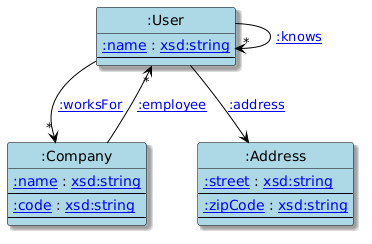
Each shape becomes a class, its datatype constraints become attributes, and every shape reference becomes an association, which makes a schema much easier to review than reading it as text.
convert_schemas can also write the schema as HTML documentation
(ResultConversionMode.Html), and it is the same call used in the DCTAP
chapter to turn a spreadsheet into ShEx and in the comparison chapter to
line two schemas up against each other.
References#
Shape Expressions - the language, its specifications and tooling.
ShEx 2.1 primer - a gentle introduction.
Shape maps - the specification of the node/shape pairing.
Validating RDF Data - a book covering ShEx, SHACL and the comparison between them.